When SwiftUI Gesture Debugging Triggers an Exclusivity Crash
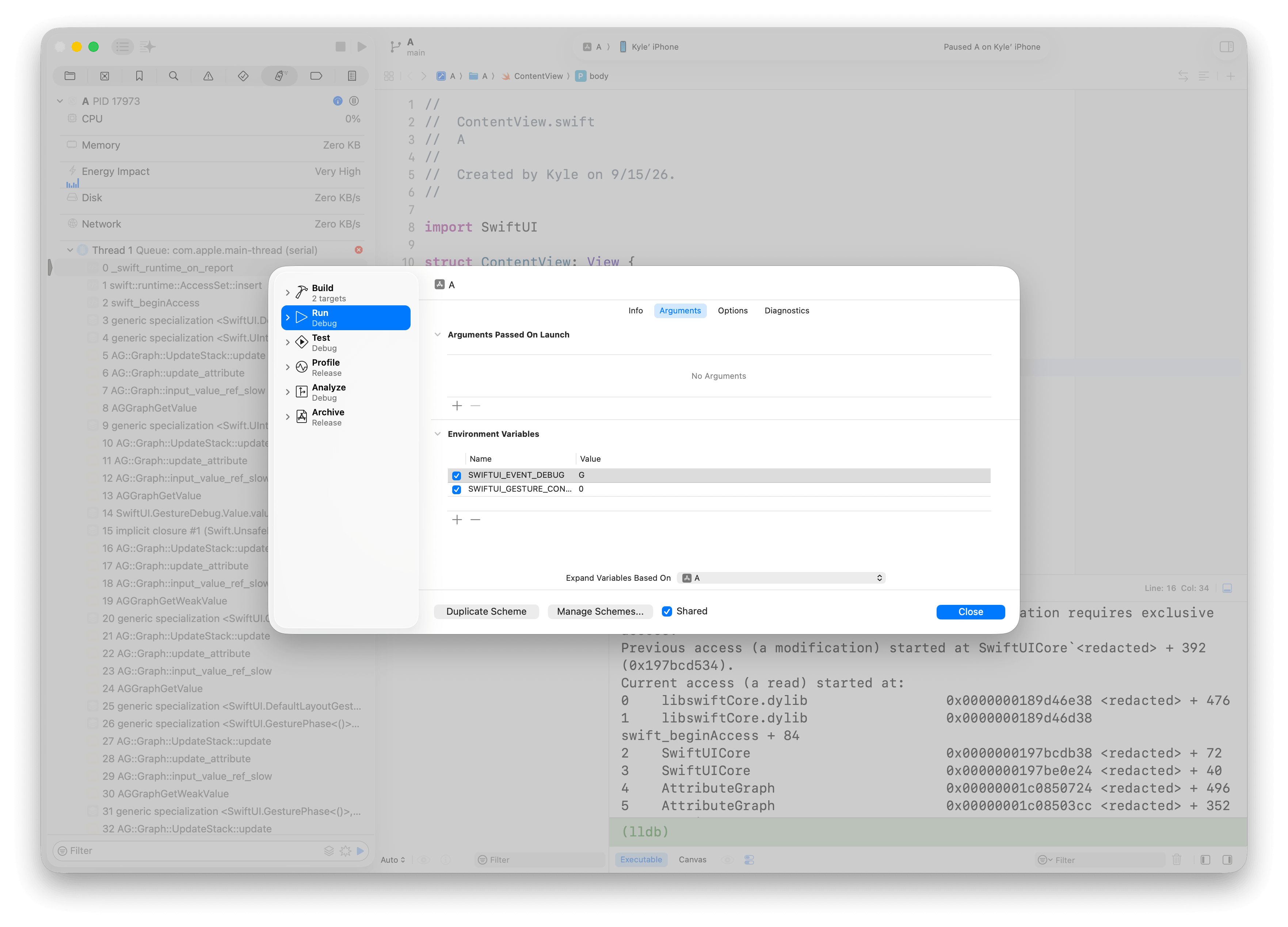
While building a tool to inspect SwiftUI gesture debug data, I found a configuration that makes SwiftUI itself crash:
SWIFTUI_GESTURE_CONTAINER=0
SWIFTUI_EVENT_DEBUG=G
With these launch settings, touching a plain Text can abort the process with an exclusive-access violation. The cause is a graph evaluation that reads an array while a mutating operation still holds write access to it.
Reported this issue to Apple as FB24791751.
A minimal reproduction
import SwiftUI

@main
struct GestureDebugCrash: App {
    var body: some Scene {
        WindowGroup {
            Text("Tap")
        }
    }
}
Add the two environment variables above to the Xcode scheme's Run configuration, launch the app, and touch the text. A plain Text is sufficient. (Run on iOS 18.0+ with Xcode 26.6)
SWIFTUI_EVENT_DEBUG=G
enables the .gestures bit in SwiftUI's internal _eventDebugTriggers option set. Its raw value is 0x20. The equivalent programmatic setting is:
_eventDebugTriggers = .gestures
The runtime reports:
Simultaneous accesses to ..., but modification requires exclusive access.
The modifying access starts in LayoutGestureBox.resetTerminalChildren(gesture:). The conflicting read starts in LayoutChildSeed.value.
How resetting a child reads the same array
The reset operation has this shape:
children[index].reset()
Child
is a value type, and reset() is mutating. Calling it through the array subscript opens a modifying access to children. That access remains active for the duration of the call.
Swift requires a modifying access to be exclusive. A nested read of the same storage can therefore conflict even when all the code runs on one thread. The Swift language guide describes this rule in its Memory Safety chapter.
The unexpected read comes from saving the child's debug data. The relevant operation inside reset() is:
if case let .attribute(attribute)? = debugData {
    debugData = .reset(attribute.value)
}
Reading an AttributeGraph attribute can evaluate its dependencies. In this case, that evaluation needs the child's reset seed and eventually reads box.children again:
LayoutGestureBox.resetTerminalChildren
  children[index].reset()
    debug attribute.value
      GestureDebug.Value.value
        AnyResetSeed.value
          LayoutChildSeed.value
            box.children
The outer reset has not returned, so its modifying access is still active when the inner read begins. The Swift runtime detects the overlap and aborts.
This explains why gesture debugging exposes the failure: enabling .gestures adds the debug-data evaluation that takes this path back into the array.
Workaround: keep gesture containers enabled
For a debugging tool, the practical workaround is to keep gesture containers enabled whenever _eventDebugTriggers.contains(.gestures) is true. Set both values in the app's launch configuration:
SWIFTUI_EVENT_DEBUG=G
SWIFTUI_GESTURE_CONTAINER=1
Apply this configuration before the app starts. With gesture containers enabled, this example uses separate gesture graphs and avoids the failing layout-gesture reset path.
Without an environment override, the default requires both the SwiftUI.gestureContainer FeatureFlag and Semantics.UnifiedHitTesting (_SemanticFeature_v6, enabled for apps linked with the iOS 18 SDK or later). The FeatureFlag is enabled on iOS 18+, so apps that meet this SDK condition already have GestureContainerFeature.isEnabled == true when SWIFTUI_GESTURE_CONTAINER is unset.
iOS 27 is a special case: apps built with an older SDK (26.5 in this test) still hit the same crash when SWIFTUI_GESTURE_CONTAINER=0 is explicitly set. Rebuilding with the iOS 27 SDK avoids the crash in the tested Text and .onTapGesture examples, even with that override.
The iOS 27 SDK enables SwiftUI's .v8 semantics. With Gesture Component support enabled, StyledTextResponder.makeGesture returns a failed phase without a debug attribute, so the Text example skips the read that exposes the conflict. SwiftUICore 8.0.84.1.104 still resets the child in place; the reset implementation itself is unchanged.
Implementation fix: reset a local child, then write it back
The proposed fix in OpenSwiftUI PR #1085 changes the lifetime of the array access. It replaces in-place resets:
children[index].reset()
with a shared LayoutGestureBox.resetChild(at:) helper:
private func resetChild(at index: Int) {
    var child = children[index]
    child.reset()
    children[index] = child

    seed.unsafeIncrement()
}
The helper separates the array accesses:
- Read the child into a local variable. The array read finishes before
reset()starts. - Reset the local child. AttributeGraph can read
childrenduring this call because the array has no active modifying access. - Write the child back after the reset finishes.
During the nested graph read, the array still contains the stored child value; the updated value becomes visible at writeback. For the reset-seed read involved in this crash, this removes the overlapping access while keeping the update synchronous.
Swift's runtime exclusivity checks remain enabled. The code now gives graph evaluation a point at which it can read the array safely.