Testing Private Members in Swift with @_private(sourceFile:)
When writing unit tests for Swift code, you often need to verify the internal state of your classes. However, Swift's access control prevents tests from accessing private members - forcing developers to either expose implementation details with internal or settle for testing only public APIs. This is where @_private(sourceFile:) comes in.
What is @_private(sourceFile:)?
@_private(sourceFile:)
is an underscored Swift attribute that completely bypasses access control, allowing you to access private declarations from specific source files in an imported module. Think of it as a surgical access control override - you can reach into a module and access private members as if they were internal.
The syntax is straightforward:
@_private(sourceFile: "Location.swift")
import OpenSwiftUICore
With this import, you can access all private members from Location.swift in the OpenSwiftUICore module.
The Problem It Solves
Let's look at a real-world example from the OpenSwiftUI project. Consider this LocationBox class:
final package class LocationBox<L>: AnyLocation<L.Value>, Location
    where L: Location
{
    final private(set) package var location: L
    @AtomicBox
    private var cache = LocationProjectionCache()

    // ... implementation
}
The cache property is private because it's an implementation detail that external code shouldn't touch. But in unit tests, you need to verify that caching works correctly:
func testCaching() {
    let location = MockLocation()
    let box = LocationBox(location)

    // How do we test that cache is working?
    // We need to access box.cache, but it's private!
}
Previously, developers had two options:
- Make
cacheinternal - exposing implementation details - Test only through public APIs - making tests less precise
Neither option is ideal. The first violates encapsulation, the second makes debugging harder.
How to Use It
Step 1: Enable Private Imports in Your Module
The target module must be compiled with -enable-private-imports. In Package.swift:
.target(
    name: "OpenSwiftUICore",
    swiftSettings: [
        .unsafeFlags(["-Xfrontend", "-enable-private-imports"])
    ]
)
Step 2: Use @_private in Your Test
In your test file:
#if OPENSWIFTUI_ENABLE_PRIVATE_IMPORTS
@_private(sourceFile: "Location.swift")
import OpenSwiftUICore
#endif
Step 3: Access Private Members
Now you can access private members directly:
func testCaching() {
    let location = MockLocation()
    let box = LocationBox(location)

    // Access the private cache!
    #expect(box.cache.isEmpty == true)

    box.projecting(keyPath)

    #expect(box.cache.isEmpty == false)
}
Here's how it looks in practice with OpenSwiftUI's test suite:
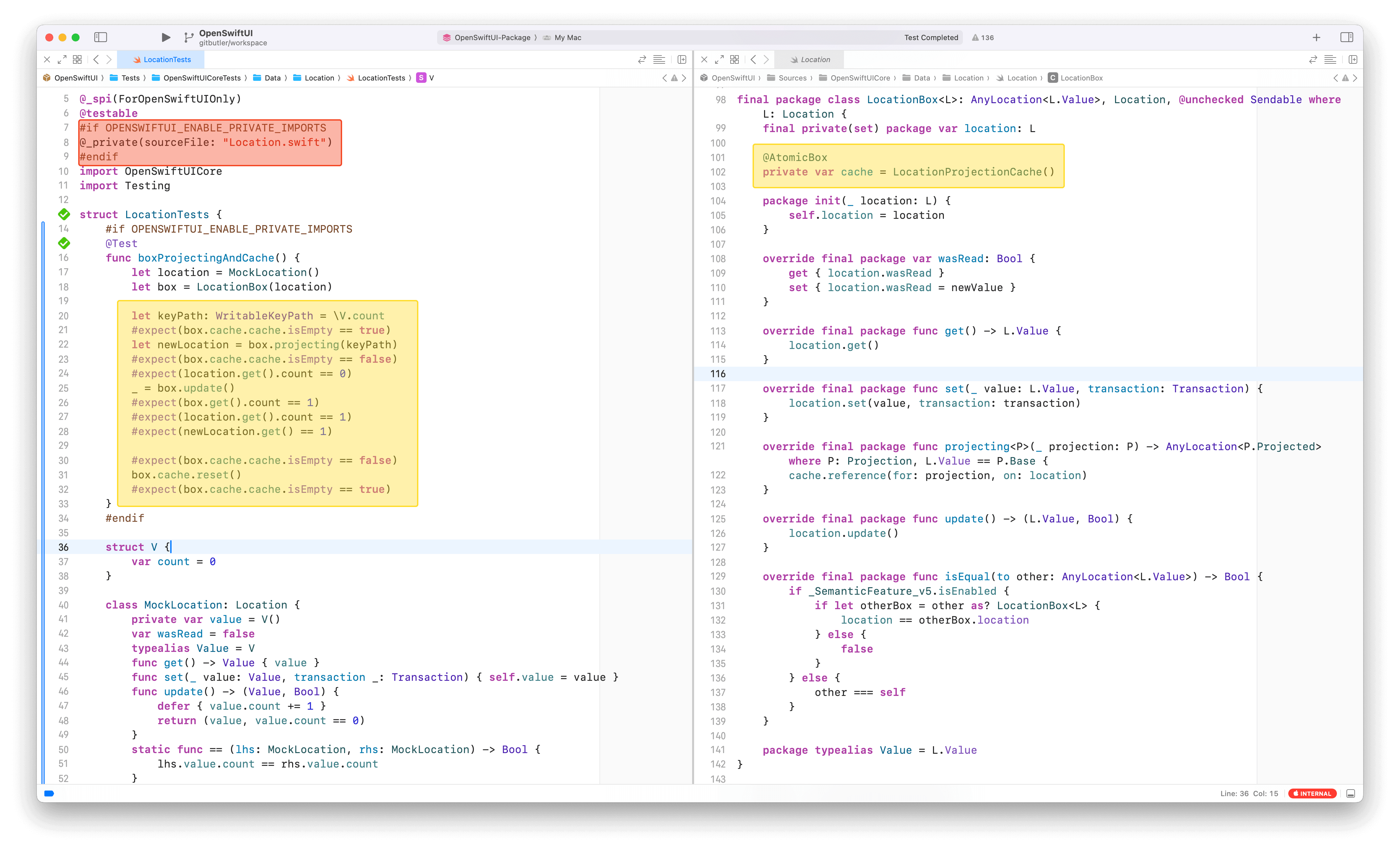
The screenshot shows the full setup:
- Line 6: Using
#ifto conditionally enable the feature - Line 8: The
@_private(sourceFile: "Location.swift")import - Lines 20-30: Testing private cache state directly
Best Practices: Use It Conditionally
Here's the crucial part: @_private(sourceFile:) is an underscored attribute, which in Swift means "compiler and standard library use only." These attributes:
- Are not part of Swift's stable ABI
- Can change or be removed without warning
- Are explicitly discouraged outside the Swift repository
This is why the OpenSwiftUI project wraps it in a conditional compilation flag:
#if OPENSWIFTUI_ENABLE_PRIVATE_IMPORTS
@_private(sourceFile: "Location.swift")
import OpenSwiftUICore
#endif
This pattern provides several benefits:
Future-proofing: If Swift removes or changes this attribute, you can disable it via environment variable
Explicit opt-in: The feature is only enabled when deliberately configured
Easy rollback: If issues arise, disable it without code changes
Setting Up the Environment Variable
In your test scheme or CI/CD environment:
export OPENSWIFTUI_ENABLE_PRIVATE_IMPORTS=1
Real-World Example
The OpenSwiftUI project demonstrates this pattern effectively in PR #540. The changes include:
- Adding
-enable-private-importsto the core module's build settings - Conditionally importing with
@_private(sourceFile:)in tests - Using an environment variable to control the feature
This allows comprehensive testing of internal state while maintaining the flexibility to disable the feature if needed.
When Should You Use This?
@_private(sourceFile:)
is appropriate when:
- Writing unit tests that need to verify internal state
- The alternative is making implementation details public
- You need precise, focused tests rather than broad integration tests
- You can isolate usage to test targets only
Avoid using it when:
- You're writing production code (never import it outside tests)
- You can achieve the same coverage with public API tests
- The private members you're accessing are in third-party code (they could change)
Limitations and Considerations
Compiler version dependency: This feature requires Swift 5.x+ and may change in future versions
Module compilation requirement: The imported module must be compiled with-enable-private-imports
Maintenance burden: If the source file is renamed or members are moved, imports break
Conclusion
@_private(sourceFile:)
is a powerful tool for writing comprehensive unit tests without compromising encapsulation. By accessing private members only in test code and wrapping usage in conditional compilation, you can:
- Test internal implementation details thoroughly
- Keep your public API minimal and clean
- Maintain flexibility to adapt if Swift changes the feature
Remember the golden rule: use underscored attributes defensively. Always wrap them in feature flags, document why you're using them, and be prepared to remove them if needed.
For a complete implementation example, check out the OpenSwiftUI PR #540 which demonstrates this pattern in production.